|
'Double Feature' TrueType Font Ver. 2.0 [107 KB]
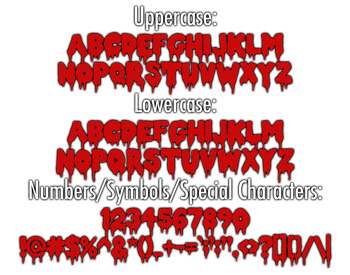
For version 2.0 (updated Feb 11 2011), this versatile typeface has been upgraded and completely redrawn to include a wider variety of differing characters in the uppercase and lowercase letters, as well as a full basic Latin character set. The font also works with multiple platforms (tested on Windows 7, Mac OS X).
Before installing fonts, you should close any open applications. For some applications, new fonts do not appear in the font menu if you install them while the application is open.
To download, click on the link above, select 'Save Link As...'. Save the font file to the folder of your choice.
Installation Instructions (Windows):
1) Click on your 'Start' button and select 'Settings' | 'Control Panel' (or open 'My Computer' then 'Control Panel')
2) Open (double-click) the Fonts folder.
3) Select File | Install New Font.
Installation Instructions (Mac):
1) In the Finder, open the folder or disk that contains the font you want to install.
2) Select the font you want to install.
3) Drag and drop the font into the Fonts folder in the Library folder.
License and Disclaimer:
This Font Software is licensed under the SIL Open Font License, Version 1.1. A copy of the license is available, along with a FAQ, at the SIL International website.
|









 Printer-Friendly Version